Particle music visualizer
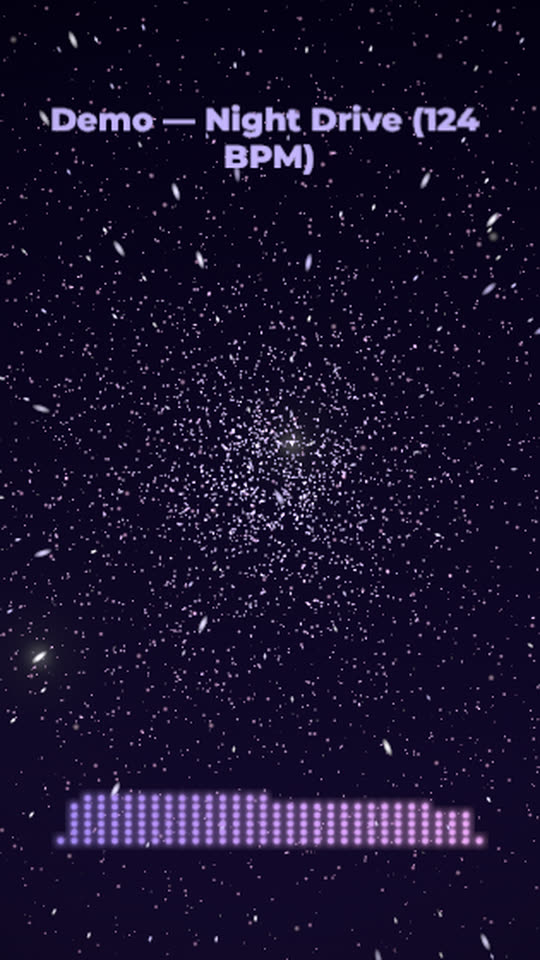
Thousands of particles fly out from the centre on every drum hit and drift back between them. Stars streak past on the hits and a dotted equalizer glows along the bottom, with an RGB split on the biggest beats.
Free, no watermark. Runs in your browser, no account needed.
Rendered by WaveMotion from the demo song. No edits outside the studio.
Each part of the song moves its own piece
- Drumsdrives the particle burst, the star streaks and the RGB split
- Full mixdrives the dotted equalizer
- Vocalsdrives the lyrics, if you add them
Upload separate stems (drums, bass, vocals and so on) and each one drives its own layer. With a single mix, the template reads the bass, mids and hits of the mix instead. Any reaction can be changed or relinked on the Audio tab.
Made for
Cinematic and electronic tracks
A space-like look for ambient builds that break into a beat.
Drum-led music
With a drums stem every hit gets its own burst.
Lyric videos
The centre stays open for lyrics over the particles.
Make it yours
- 1
Open the template and add your track, ideally with a drums stem.
- 2
Raise Burst for bigger explosions or Count for a denser cloud.
- 3
Change the equalizer colours or switch it to bars.
- 4
Export.
Want the words on screen? The lyric video maker adds karaoke lyrics on top of this template.
In every template
- Stem-reactive
- Upload a full mix or separate stems. Any setting of any layer can follow the kick, bass, vocals or any other stem.
- Lyric videos
- Paste lyrics or an LRC file and the words light up as they are sung, in every template.
- Up to 4K
- MP4 export up to 3840×2160, from 24 to 60 fps.
- Four aspect ratios
- 16:9, 9:16, 1:1 and 4:5. Templates lay themselves out for each one.
- Free, no watermark
- No account, no credits and no logo on the export.
- Renders locally
- The video renders in your browser on your graphics card. Your audio is not uploaded.
Frequently asked questions
They run on your graphics card. On a slow computer, lower the preview quality in the studio; the export still renders every frame at full size.
Yes. Pick any stem for the particles on the Audio tab, for example the vocals for a burst on each phrase.
16:9, 9:16, 1:1, 4:5 and 4K, from 24 to 60 fps.
Your next release deserves visuals that listen
Open the studio, drop in your track, and watch the first template react to it in seconds.