Vinyl record music visualizer
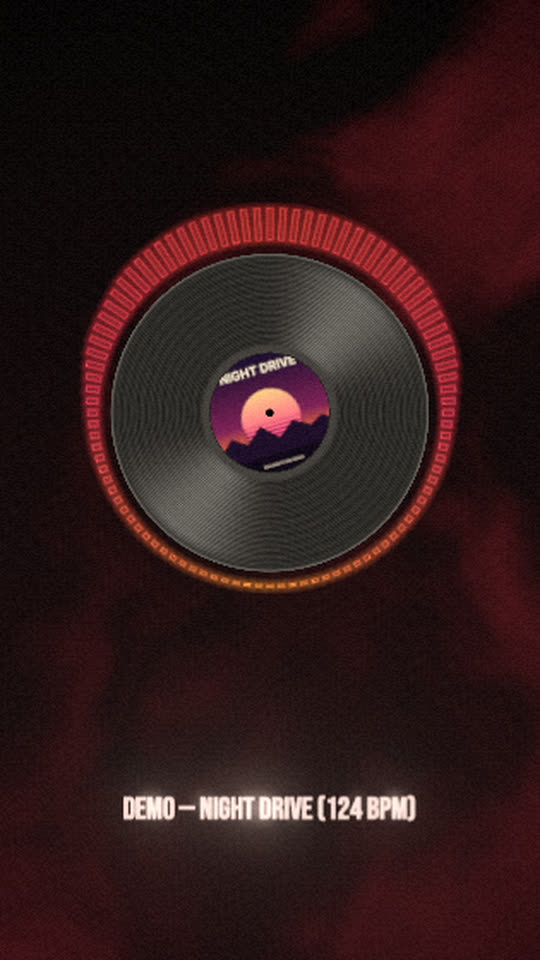
A black record turns at 33 rpm with your artwork as its centre label. Outlined bars circle the record and jump with the music, light catches the grooves, and a red haze drifts behind it on the bass.
Free, no watermark. The studio asks for your cover art, then builds the scene around it.
Rendered by WaveMotion from the demo song and a demo cover. No edits outside the studio.
Each part of the song moves its own piece
- Full mixdrives the ring of outlined bars
- Kickdrives a small pulse of the record and the glow of the bars
- Bassdrives the red haze behind the record
- Vocalsdrives the lyrics, if you add them
Upload separate stems (drums, bass, vocals and so on) and each one drives its own layer. With a single mix, the template reads the bass, mids and hits of the mix instead. Any reaction can be changed or relinked on the Audio tab.
Made for
Full-track YouTube upload
A calm, looping visual that holds attention for a whole song without distracting from it.
Vinyl and pre-order announcements
Show the release as a record, with the real cover on the label, for a pressing or a pre-save campaign.
DJ mixes and radio shows
Bars that follow the music for an hour-long mix, in 16:9 or 1:1.
Make it yours
- 1
Open the template and add your song.
- 2
Choose your cover: it becomes the label in the centre of the record.
- 3
Set the spin on the record layer (33 rpm by default, 45 for a single), or make the label larger.
- 4
Recolour the bars, or set their outline to 0 for filled bars, then export.
Want the words on screen? The lyric video maker adds karaoke lyrics on top of this template.
In every template
- Stem-reactive
- Upload a full mix or separate stems. Any setting of any layer can follow the kick, bass, vocals or any other stem.
- Lyric videos
- Paste lyrics or an LRC file and the words light up as they are sung, in every template.
- Up to 4K
- MP4 export up to 3840×2160, from 24 to 60 fps.
- Four aspect ratios
- 16:9, 9:16, 1:1 and 4:5. Templates lay themselves out for each one.
- Free, no watermark
- No account, no credits and no logo on the export.
- Renders locally
- The video renders in your browser on your graphics card. Your audio is not uploaded.
Frequently asked questions
Yes. Select the record and change Spin: 33 rpm by default, 45 for a 7-inch feel, or any value from −60 to 60. You can also link the speed to a stem.
The record still draws, with a plain red label. Add a picture later from the Templates tab and the template rebuilds around it.
Yes. The bars have an Outline setting in pixels. Set it to 0 for solid bars, or raise it for a thicker edge.
Yes. The MP4 is free, with no watermark and no account, up to 4K.
Related templates
All templates →
Your next release deserves visuals that listen
Open the studio, drop in your track, and watch the first template react to it in seconds.