Stage lights music visualizer
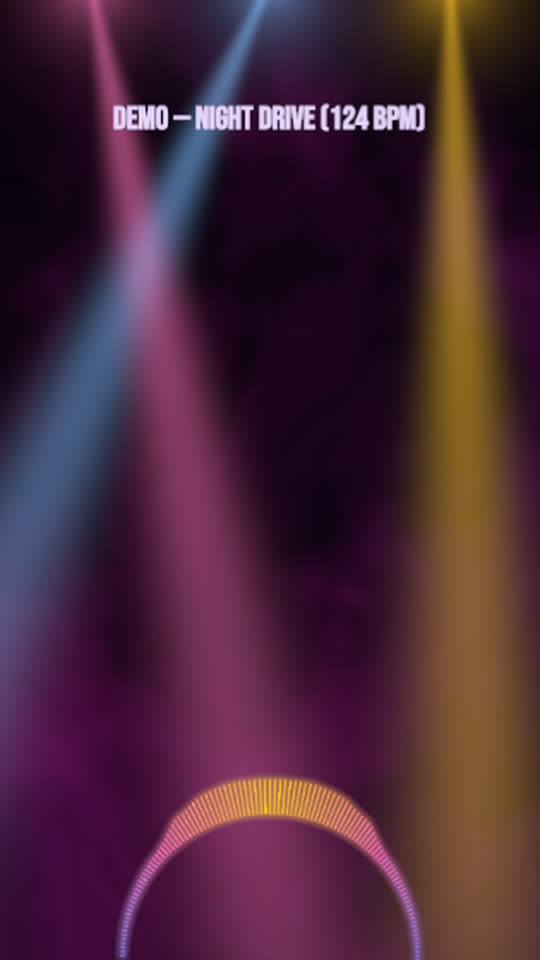
Coloured beams sweep down through the haze and open out with the bass, like the light rig at a show. A half circle of bars rises from the stage floor and a short strobe fires only on the biggest hits.
Free, no watermark. Runs in your browser, no account needed.
Rendered by WaveMotion from the demo song. No edits outside the studio.
Each part of the song moves its own piece
- Bassdrives how far the beams spread, how bright they flash, and the haze
- Drumsdrives the strobe and the glow of the bars
- Full mixdrives the half circle of bars
- Vocalsdrives the lyrics, if you add them
Upload separate stems (drums, bass, vocals and so on) and each one drives its own layer. With a single mix, the template reads the bass, mids and hits of the mix instead. Any reaction can be changed or relinked on the Audio tab.
Made for
Live and festival energy
A concert feel for a studio track, a live recording or a tour announcement.
Rock, pop and EDM
The strobe waits for the strongest hits, so it suits both band and club music.
Vertical teasers
Fewer beams in 9:16 keep the frame readable on a phone.
Make it yours
- 1
Open the template and add your track or stems.
- 2
Change the beam colours, count and sweep on the Stage beams layer.
- 3
Turn the strobe down or off if you post to platforms with flash guidelines.
- 4
Export.
Want the words on screen? The lyric video maker adds karaoke lyrics on top of this template.
In every template
- Stem-reactive
- Upload a full mix or separate stems. Any setting of any layer can follow the kick, bass, vocals or any other stem.
- Lyric videos
- Paste lyrics or an LRC file and the words light up as they are sung, in every template.
- Up to 4K
- MP4 export up to 3840×2160, from 24 to 60 fps.
- Four aspect ratios
- 16:9, 9:16, 1:1 and 4:5. Templates lay themselves out for each one.
- Free, no watermark
- No account, no credits and no logo on the export.
- Renders locally
- The video renders in your browser on your graphics card. Your audio is not uploaded.
Frequently asked questions
It is capped below full white and fires only on the strongest hits. You can lower its strength or mute it in the timeline.
Yes, from 1 to 8 on the Stage beams layer. The template uses five in 16:9 and three in tall sizes.
Radial bars with Arc set to 180°, centred on the bottom edge. Change the arc or the radius to reshape it.
Related templates
All templates →
Your next release deserves visuals that listen
Open the studio, drop in your track, and watch the first template react to it in seconds.